80년대말 이후, 미디 규격의 표준의 삼대 축으로 자리잡아온
야마하의 인터넷 탐색기용 미디 콘트롤박스 아돈입니다.(addon..은 이 경우 꼭 아돈으로 읽히는 이유가 있대요.)
야마하 소프트 신디사이저와 함께, 지금은 거의 잊혀진 기술 취급을 받고 있기도 하다지만
미디는 진짜 동인의 로망!
매드와 함께 저작물의 왕도..라고나 할까요?
어쨌건, 미디에 제목글을 달아서 걸 수 있다는 특전이 붙어 있는 탓으로
개발된지 8년이 넘도록 애용되고 있는 도구랍니다.
미디 타이틀은 각자 쓰는 거라서 이러∼게도 쓰인다는 예시로
"이웃집 또터러"라고 제목을 붙인 객체를 스샷으로 실을게요.
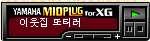
야마하 미디플러긴의 액티브X 쓰는 법은 맨 아래에 달아둘게요
mpxg101.cab Netscape/Mozilla/Firefox 대응플러그인
mcxg101.cab MS_Internet Explorer 대응 액티브X 컨트롤
야마하 미디플러긴의 액티브X 쓰는 법은 아래와 같습니다.
<OBJECT ID="MIDPLUG"WIDTH=150 HEIGHT=40
CLASSID="CLSID:B0C207A3-42EE-11D0-9DB3-00805F8A73C5">
<PARAM NAME="Src" VALUE="***.mid">
<EMBED SRC="***.MID" TYPE="audio/midi" WIDTH=150
HEIGHT=40 PANEL=0/1 TEXT="midi title" AUTOSTART=true
LOOP=true SAVE=true>
</EMBED></OBJECT>
그 밖의 옵션들은 로 오브제 안에 끼워 넣는 데, 대표적인 값들은
AutoStart, EnableCue, EnableEvent, Mute, Panel(0흰색/1검정), PanelSize, Repeat, Src, Text(곡명 표시), Transpose, Volume(0∼100), Savable
그 밖의 값들은 IE용 플러긴의 레퍼런스를 참고하세요.
"WIDTH=150 HEIGHT=40" will display a 150 x 40 pixel control panel:
PANEL=0 (White) PANEL=1 (Black)
"WIDTH=100 HEIGHT=30" will display a 100 x 30 pixel control panel:
PANEL=0 (White) PANEL=1 (Black)
"WIDTH=40 HEIGHT=35" will display a 40 x 35 pixel control panel: (White Only)
# By setting "HEIGHT=0" you can hide the panel. In this case, user control will not be possible.
# "AUTOSTART=TRUE" is the normal setting, causing playback to begin automatically when the page is opened. When "AUTOSTART=FALSE",
playback will begin only when the Play button of the control panel is pressed.
# "REPEAT=TRUE" is the normal setting, causing the song playback to repeat until the stop button is pressed. When "REPEAT=FALSE" the song will playback once and then stop at the end of the song.
# When "PANEL=0" the control panel will have a light color scheme
(normal setting). When "PANEL=1" the control panel will have a
dark color scheme. (The 40 x 35 pixel control panel provides only one color scheme, and the same panel will appear regardless of whether "PANEL=" is set to 0 or 1.)
# When "SAVE=true", the file can be downloaded to a PC. When "SAVE=false", the file can't be downloaded. When "SAVE" is omitted, it will be same as "SAVE=false".
# TYPE="audio/midi" is used for the MIME type setting of the server, to let the server to send a MIDI file.







 mcxg110.cab (797.4KBytes)